
PicMa: AI Video&Photo Enhancer
MTTech Ltd.Photography
4.32.21K Reviews
- Version
- 3.7.21
- Installs
- 5.00M
- Age Rating
- Teen
Screenshots






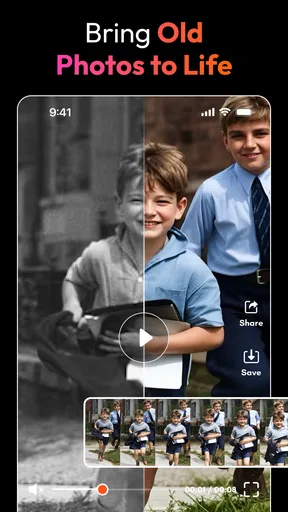
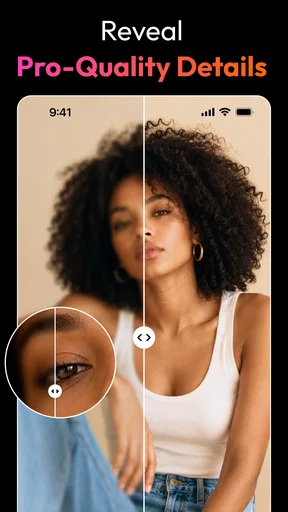
Our Review of PicMa: AI Video&Photo Enhancer
 Analysis by Appyee
Ever scrolled through your photo gallery and thought, "Wow, this picture would be perfect if only it were clearer?" Well, I've been there, and that's when I stumbled upon PicMa: AI Video&Photo Enhancer. Let me tell you, this app is like having a magic wand right on your phone.
First Impressions
Downloading the app was a breeze. It’s available for both Android and iOS, so no one’s left out. Once installed, PicMa: AI Video&Photo Enhancer greets you with a sleek and intuitive interface. No clutter, just straightforward options that make you want to dive right in and start enhancing all those blurry memories.
Features That Stand Out
Here's where things get interesting. The app promises to transform your images and videos using AI, and it doesn’t disappoint. You have the option to enhance photos and videos, and it’s all done with a few taps. I was curious, so I tried enhancing an old vacation photo that looked like it was taken through a foggy lens. The result? Crisp, clear, and vibrant. It was like the photo had been taken with a high-end camera.
- Photo Enhancement: The app uses AI to intelligently fill in details in photos. It’s almost like magic.
- Video Enhancement: This feature is a game-changer. If you’ve got grainy old videos, this app can bring them to life with just a tap.
- Batch Processing: Have tons of photos? No problem. You can enhance them all at once, saving you a lot of time.
Ease of Use
One of the things I love about PicMa: AI Video&Photo Enhancer is how user-friendly it is. You don’t need to be a tech whiz to use it. The app guides you through every step with clear instructions, and in case you get stuck, there’s a handy help section. It’s perfect for those who want quick results without a steep learning curve.
Performance and Speed
Let’s talk about speed. You’d think that processing high-res images and videos would take forever, right? Not with this app. Enhancements are done quickly, and you can see the changes in real-time. I was pleasantly surprised by how fast it could churn out high-quality results. It’s perfect for those of us who want instant gratification.
Personal Touch
What makes PicMa stand out is the personal touch it offers. There's a sense of customization that you don’t often find in similar apps. You can adjust the level of enhancement, giving you control over how your images look. It’s like you’re the artist, and the app is your brush.
Why You’ll Love It
If you're into preserving memories, this app is a must-have. It’s not just about making your photos look good; it’s about breathing new life into them. Whether it’s a family photo, a scenic view, or a video from your last vacation, PicMa ensures your memories stay as sharp as your recollection of them.
So, if you’re on the hunt for an easy-to-use app that packs a punch in the enhancement department, give PicMa: AI Video&Photo Enhancer a shot. It’s like having a digital upgrade for all your visual memories, and trust me, you won’t regret it.
Verdict
Strengths of PicMa: AI Video&Photo Enhancer
- Enhances image quality with AI precision.
- User-friendly interface for easy navigation.
- Supports batch processing of photos.
- Offers a wide range of editing tools.
- Regular updates with new features.
Limitations of PicMa: AI Video&Photo Enhancer
- Requires a stable internet connection.
- Free version has limited features.
- High-resolution exports need a subscription.
- Occasional slow processing times.
- Ads can be intrusive in the free version.
Similar Picks in This Category
View All
Google Photos
Google LLC4.4

Gallery
Google LLC4.2

Picsart AI Photo Editor, Video
PicsArt, Inc.3.9

B612 AI Photo&Video Editor
SNOW Corporation4.1

BeautyPlus-Selfie Photo Editor
PIXOCIAL TECHNOLOGY (SINGAPORE) PTE. LTD.4.5

Remini - AI Photo Enhancer
Bending Spoons4.1
Frequently Asked Questions
What features does PicMa: AI Video & Photo Enhancer offer?
PicMa offers a variety of features designed to enhance both videos and photos. These include AI-driven tools for sharpening images, increasing resolution, reducing noise, and enhancing colors. Additionally, it provides options for retouching portraits, adding artistic filters, and batch processing for convenience. The app is tailored for both casual users and professionals.
Is PicMa compatible with all devices?
PicMa is available for both Android and iOS devices, ensuring wide compatibility. However, due to its AI-driven features, it may require more recent operating systems and higher processing power. Users with older devices might experience slower performance or limited functionality, so it's advisable to check device requirements before downloading.
Does PicMa require an internet connection to function?
While PicMa can perform basic enhancements offline, many of its advanced AI features require an internet connection. This connection allows the app to access cloud-based AI resources for more powerful processing. Users should ensure they have a stable internet connection to fully utilize all features offered by PicMa.
Are there any in-app purchases or subscriptions in PicMa?
Yes, PicMa offers in-app purchases and subscription plans. While the app provides a range of free features, some advanced tools and processing capabilities are locked behind a paywall. Users can choose to make one-time purchases or subscribe to a monthly or annual plan to access premium features and remove ads.
Is my data safe when using PicMa?
PicMa prioritizes user privacy and data security. The app follows strict privacy protocols and complies with data protection regulations. Photos and videos processed through the app are not stored on the servers permanently. Users should review the app’s privacy policy to understand how their data is handled and protected.
